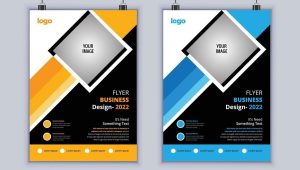
🎨 What Is a Photoshop Flyer Template?
A Photoshop flyer template is a pre-designed .PSD file that you can open in Adobe Photoshop and customize to fit your needs. These templates are layered and fully editable, so you can easily change:
- Text
- Images
- Colors
- Fonts
- Layout elements
They’re ideal for people who want professional results without starting from scratch.
✅ Why Use Photoshop Flyer Templates?
- Saves time – No need to design from a blank canvas.
- Professional look – Designed by experts for print and digital use.
- Customizable – Tweak every element to match your brand or event.
- Print-ready – Comes with CMYK color mode and correct bleed settings.
Do you also need a flyer design? Click here.
🛍️ Where to Find Photoshop Flyer Templates
1. Freepik
- Huge collection of free and premium PSD flyers.
- Great for events, parties, sales, and more.
2. Envato Elements
- Premium templates with top-tier design quality.
- Unlimited downloads with subscription.
3. Flyer.lk
- Custom editing of any PSD flyer template.
- Send us the template link or file—we’ll customize it for you.
- Get print-ready, polished flyers without needing Photoshop skills.
✏️ How to Edit a PSD Flyer Template in Photoshop
- Open the .PSD file in Photoshop
- Double-click text layers to edit your message
- Replace images by right-clicking on image layers and choosing “Replace Contents”
- Change colors using adjustment layers or layer styles
- Save as PDF or JPG for print or online sharing
📌 Don’t Have Photoshop?
No problem. Just send us your PSD file at Flyer.lk, and we’ll:
- Customize the flyer for you (text, colors, logos, etc.)
- Export it in high-res format
- Deliver a print-ready or digital version—fast and affordable